Creating content with ChatGPT looks easy.
Open ChatGPT.
Type:
“Write a blog post about…”
Press Enter.
Unfortunately, that’s exactly where most beginners go wrong.
The result is often generic content that lacks structure, originality, and real value.
The problem isn’t ChatGPT.
The problem is using ChatGPT as a writer instead of a content creation assistant.
Professional creators don’t ask ChatGPT to do everything.
Instead, they use it strategically throughout the entire content creation process—from brainstorming ideas to publishing and repurposing content.
In this guide, you’ll learn a practical ChatGPT content creation workflow that helps beginners create blogs, articles, newsletters, and other content more efficiently while still keeping human creativity and decision-making at the center.
Whether you’re a:
- Content creator
- Blogger
- Freelancer
- Solopreneur
- Beginner learning AI
this workflow will help you use ChatGPT more effectively.
Table of Contents
⚡ Quick Answer
The best ChatGPT content creation workflow is:
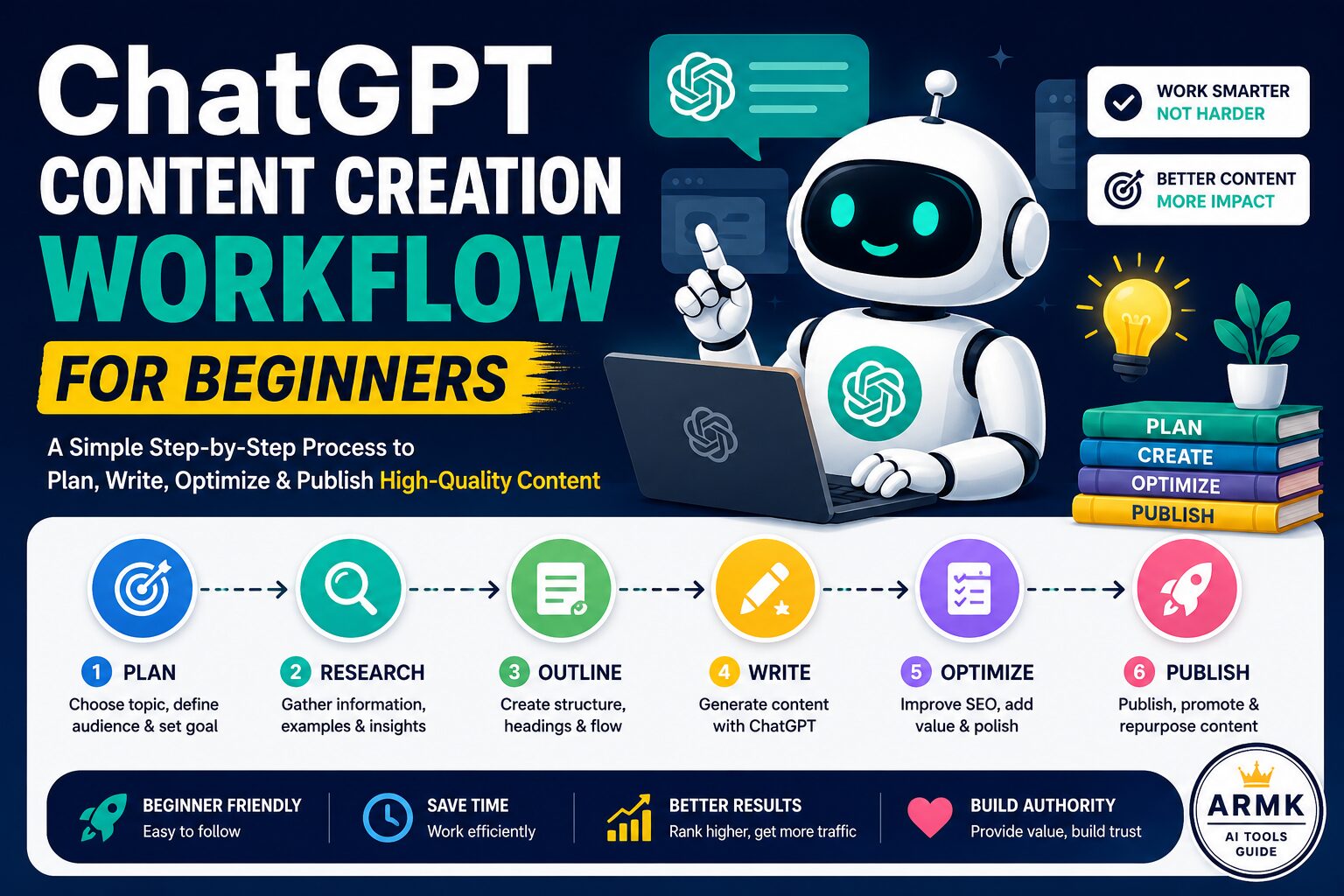
Idea → Validate → Research → Outline → Draft → Improve → SEO → Publish → Repurpose
Instead of asking ChatGPT to generate an entire article in one prompt, use it to complete one task at a time.
This produces content that is usually more structured, more useful, and easier to improve than relying on a single long prompt.
Why ChatGPT Alone Doesn’t Create Great Content
Many beginners believe ChatGPT can generate a complete, publish-ready article with a single prompt.
While it can produce a good first draft, high-quality content usually requires more than that.
Successful creators don’t use ChatGPT as a replacement for their thinking.
They use it to speed up repetitive tasks while making the important decisions themselves.
Before you begin, remember these three principles:
1. ChatGPT Works Better with Clear Context
Tell ChatGPT who your audience is, what problem you’re solving, and what outcome you want. Better context usually leads to more relevant responses.
2. Build Content One Step at a Time
Instead of generating an entire article in one prompt, use ChatGPT separately for idea generation, outlining, drafting, editing, and SEO review.
3. Treat AI Output as a First Draft
The best content usually comes after reviewing, refining, fact-checking, and adding your own insights—not from publishing the first AI response.
Before You Start: Think Like a Content Strategist
Before opening ChatGPT, answer these three questions:
Who am I creating this content for?
Examples:
- Students
- Freelancers
- Bloggers
- Small business owners
What problem should this content solve?
Instead of writing:
“AI Tools”
write:
“How beginners can use AI tools to save time while creating content.”
Clear problems usually lead to clearer content.
What should readers be able to do after reading?
Every article should have a practical outcome.
For example:
After reading this guide, a beginner should be able to:
- generate content ideas
- create better outlines
- write articles with ChatGPT
- improve AI-generated drafts
- publish content more confidently
That objective will guide every prompt you write.
The Complete ChatGPT Content Creation Workflow
Let’s go through the workflow step by step.
Step 1: Generate Content Ideas
Every great article starts with a useful idea.
Instead of asking:
“Give me blog ideas.”
give ChatGPT context about your audience.
Better Prompt
Act as a content strategist.

My audience is beginner content creators.

Suggest 20 blog post ideas that solve real problems.

Group them into:
• Beginner guides
• Comparison articles
• Tutorials
• Common mistakes
• Trending topics
Why This Works
Instead of random ideas, ChatGPT generates ideas based on audience needs.
This usually produces more targeted content opportunities.
Decision Check
Before moving forward, ask yourself:
✅ Does this topic solve a real problem?
✅ Can I add useful examples or practical guidance?
If the answer is “no,” choose another topic.
Good content starts with choosing the right idea—not writing faster.
Step 2: Validate the Idea
Not every idea deserves an article.
Before writing, use ChatGPT to evaluate whether the topic is worth pursuing.
Prompt
Analyze this topic:

"[Your Topic]"

Tell me:

• Who is searching for it?
• What problems are they trying to solve?
• Is this beginner, intermediate, or advanced?
• What questions should the article answer?
• What mistakes do competitors usually make?
This helps clarify search intent before writing.
Decision Check
Ask:
Does this topic answer one clear question?
If your article tries to solve five unrelated problems, readers are more likely to leave confused.
One article.
One primary problem.
One clear outcome.
Step 3: Research the Topic with ChatGPT
ChatGPT can help organize information before you begin writing.
Instead of asking for a full article, ask it to explore the topic.
Prompt
Help me research:

"[Your Topic]"

Summarize:

• Key concepts
• Common beginner questions
• Typical mistakes
• Important terminology
• Areas that require fact-checking
The goal here isn’t to copy ChatGPT’s answers.
It’s to build a stronger understanding of the topic.
Practical Tip
If you’re writing content that depends on current information or recent developments, combine this workflow with external research.
Step 4: Create a Detailed Outline
Never start writing from a blank page.
A clear outline makes the drafting process much easier.
Prompt
Create a detailed outline for an article about:

"[Your Topic]"

Include:

• H2 headings
• H3 subheadings
• Frequently asked questions
• Real examples
• Comparison tables
• Practical tips
Review the outline before moving on.
Remove repetitive sections.
Combine overlapping ideas.
Add examples where needed.
A strong outline often saves more time than trying to fix a weak first draft later.
Want more reusable prompt ideas? Explore our 50+ ChatGPT Prompts for Students (2026) guide to learn how structured prompts improve ChatGPT’s output across different tasks.
Step 5: Write the First Draft (One Section at a Time)
This is where many beginners make their biggest mistake.
They ask ChatGPT:
“Write a complete 2,500-word article.”
While ChatGPT can generate a full article, the result often feels repetitive or generic.
A better workflow is to write one section at a time.
Recommended Workflow
Introduction
↓
Section 1
↓
Section 2
↓
Section 3
↓
FAQs
↓
Conclusion
This gives you more control over quality, structure, and tone.
Prompt
Act as an experienced content writer.

Write only the Introduction for this article.

Audience:
Beginner content creators.

Tone:
Friendly, practical, and easy to understand.

Do not write the rest of the article.
Repeat the process for each H2 section.
Practical Tip
After each section, read it yourself.
Ask:
- Does this solve the reader’s problem?
- Is anything repetitive?
- Can I add a real example?
Small improvements after each section are much easier than rewriting an entire article later.
Step 6: Improve Readability
Once the draft is complete, don’t publish it immediately.
Instead, ask ChatGPT to improve what you’ve already written.
Good editing usually means:
- shorter paragraphs
- simpler language
- smoother transitions
- less repetition
- clearer explanations
Prompt
Improve this section.

Requirements:

• Keep the meaning the same.
• Remove repetition.
• Simplify difficult sentences.
• Improve readability.
• Do not add fake information.
Practical Tip
Don’t accept every suggestion automatically.
If a sentence already sounds natural, keep it.
Your goal is better readability—not rewriting everything.
Step 7: Optimize the Article for SEO
SEO doesn’t begin before writing.
It begins after you’ve created useful content.
Now ask ChatGPT to review your article.
Prompt
Review this article for SEO.

Check:

• Heading structure
• Keyword placement
• Meta title ideas
• Meta description
• FAQ opportunities
• Internal linking suggestions

Do not rewrite the article.
What to Review Manually
Even after ChatGPT’s suggestions, check:
✅ H1 appears only once
✅ Primary keyword appears naturally
✅ Headings are descriptive
✅ Internal links connect related guides
✅ Images include descriptive alt text
Good SEO also depends on clear structure, useful visuals, and strong user experience—not just keyword placement.
Step 8: Repurpose Your Content
Publishing the article isn’t the end of the workflow.
One article can become several content pieces.
For example:
One blog post →
- LinkedIn post
- X (Twitter) thread
- Email newsletter
- YouTube video outline
- Instagram or LinkedIn carousel
Prompt
Turn this article into:

• One LinkedIn post
• One X thread
• One email newsletter
• One YouTube video outline

Keep each version appropriate for its platform.
This saves time while helping you reach different audiences.
If one of your repurposed formats is a presentation or workshop, our Best AI Tools for Presentation Making (2026) guide compares tools that can help turn written content into professional slides more efficiently.
Example: How a Beginner Can Use This ChatGPT Workflow
Let’s say your goal is to publish an article on:
“Best AI Tools for Content Creators”
Step 1
Ask ChatGPT to brainstorm article ideas for students.
↓
Step 2
Use ChatGPT to understand the audience and clarify search intent.
↓
Step 3
Research beginner questions and organize important concepts.
↓
Step 4
Generate a structured outline.
↓
Step 5
Write one section at a time.
↓
Step 6
Improve readability and remove repetition.
↓
Step 7
Review SEO elements and internal links.
↓
Step 8
Repurpose the article into LinkedIn, X, and newsletter content.
Instead of relying on one long AI response, you’ve guided ChatGPT through every stage of the content creation process.
The result is usually more organized, easier to edit, and better suited to your audience.
Already publishing content? Learn how to turn one article into multiple platform-ready assets with our AI Content Repurposing Workflow (2026).
ChatGPT Workflow vs Multi-Tool AI Workflow
You might wonder:
“Do I need more AI tools?”
The answer depends on your goals.
| Task | ChatGPT Only | Multi-Tool Workflow |
|---|---|---|
| Idea Generation | ✅ Very Good | ✅ Excellent |
| Basic Research | ✅ Good | ✅ Better |
| Writing Drafts | ✅ Excellent | ✅ Excellent |
| Editing | ✅ Good | ✅ Better |
| SEO Optimization | ✅ Basic Review | ✅ Specialized SEO Tools |
| Image Creation | Limited | Canva AI / Other Tools |
| Content Repurposing | ✅ Excellent | ✅ Excellent |
For beginners, ChatGPT is often enough to build a complete workflow.
As your content grows, adding specialized tools can improve research, SEO, and design.
👉 Want to learn how to combine ChatGPT with other AI tools?
Read our AI Content Creation Workflow (2026): From Idea to Published Content guide.
That article explains how creators use different AI tools together instead of relying on a single platform.
Common Mistakes Beginners Make When Using ChatGPT
Learning the workflow is important.
Avoiding common mistakes is equally important.
Here are the mistakes we see most often.
Mistake #1: Copy-Pasting ChatGPT’s First Response
ChatGPT generates a good starting point—not a finished article.
Publishing the first response without editing often results in:
- repetitive writing
- generic advice
- weak examples
- little originality
Always review and improve AI-generated content before publishing.
Mistake #2: Using the Same Prompt for Everything
One prompt cannot perform every task effectively.
Instead, use different prompts for:
- idea generation
- research
- outlining
- drafting
- editing
- SEO review
- repurposing
Giving ChatGPT a clear role usually produces better results.
Many of these habits apply beyond content creation. Our 7 Mistakes Students Make Using AI Tools guide explains common AI usage mistakes that are equally relevant to creators and freelancers.
Mistake #3: Ignoring Your Audience
Before every prompt, ask yourself:
Who is this content for?
Content written for students is very different from content written for freelancers or business owners.
The more context you give ChatGPT about your audience, the more relevant its responses become.
Mistake #4: Never Fact-Checking Important Information
ChatGPT can occasionally provide outdated or inaccurate information.
Whenever accuracy matters—especially for statistics, regulations, or recent events—verify the information using reliable sources before publishing.
Mistake #5: Forgetting Human Experience
Readers don’t just want information.
They want practical insights.
Whenever possible, include:
- your observations
- lessons learned
- real examples
- recommendations based on experience
These additions make your content more useful and more difficult to copy.
Before vs After: Better Prompt, Better Content
Many beginners ask:
“Write a blog post about AI tools.”
That prompt is too broad.
A more effective prompt gives ChatGPT context and a clear objective.
Basic Prompt ❌
Write a blog post about AI tools.
Improved Prompt ✅
Act as an experienced content strategist.

Write an introduction for a beginner-friendly article titled:

"Best AI Tools for Students."

Audience:
Students with little AI experience.

Goal:
Help readers understand how AI tools can improve studying without replacing learning.

Tone:
Practical, clear, and conversational.

Avoid generic marketing language.
The second prompt gives ChatGPT enough context to produce more focused and useful output.
Quick Prompt Framework You Can Reuse
Whenever you’re unsure what to ask ChatGPT, remember this simple framework:
Role → Task → Audience → Goal → Format → Constraints
Example:
- Role: Content strategist
- Task: Create an outline
- Audience: Beginner bloggers
- Goal: Teach a workflow
- Format: H2 and H3 headings
- Constraints: Avoid repetition and include FAQs
This structure works for almost any content creation task.
ChatGPT Content Creation Checklist
📥 Free Download: AI Content Publishing Checklist
Creating great content isn’t just about writing—it’s about following a repeatable process.
To make publishing easier, we’ve turned this workflow into a reusable checklist you can save, print, or duplicate for every article.
👇 Choose the format that works best for your workflow.
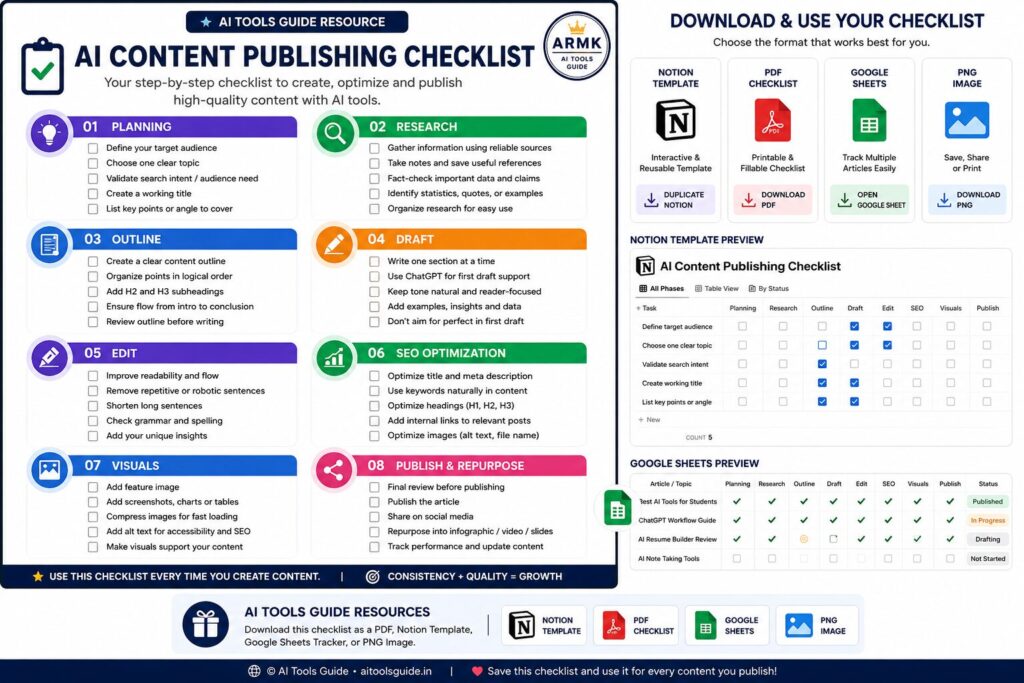
Available Formats 📥Downloadable
✅ Interactive Notion Template
✅ PNG Image
Use whichever format fits your workflow. All versions follow the same publishing system, so you can stay organized from idea to publication.
Before publishing your content, review this checklist.
Planning
☐ Chose one clear topic
☐ Identified the target audience
☐ Defined the article’s main goal
Content Creation
☐ Generated multiple ideas before selecting one
☐ Created a detailed outline
☐ Wrote one section at a time
☐ Added real examples
☐ Removed repetitive AI-generated text
Editing
☐ Improved readability
☐ Simplified long sentences
☐ Checked grammar
☐ Added practical insights
SEO
☐ Optimized headings
☐ Reviewed keyword placement
☐ Added internal links
☐ Created meta title
☐ Created meta description
☐ Added image alt text
Publishing
☐ Added feature image
☐ Added workflow diagram
☐ Published article
☐ Repurposed content for social media
Following this checklist helps ensure your content is complete before you hit publish.
Final Recommendation
If you’re just getting started, don’t worry about mastering dozens of AI tools.
Learn one workflow first.
ChatGPT alone is capable of helping you:
- generate ideas
- research topics
- build outlines
- write drafts
- improve readability
- review SEO
- repurpose content
Once you’re comfortable with this process, you can gradually combine ChatGPT with specialized AI tools for research, design, and SEO.
The goal isn’t to let AI think for you.
The goal is to spend less time on repetitive tasks and more time creating content that genuinely helps your audience.
Best ChatGPT Alternatives (2026) (“If ChatGPT doesn’t fit your workflow…”)
Frequently Asked Questions
1. How do content creators use ChatGPT?
Most creators use ChatGPT for brainstorming ideas, researching topics, creating outlines, drafting content, improving readability, and repurposing articles into different formats.
2. Can ChatGPT create blog content?
Yes. ChatGPT can help generate blog drafts, but the best results come from editing, fact-checking, and adding your own examples before publishing.
3. What is the best ChatGPT workflow for content creation?
A practical workflow is:
Idea → Validate → Research → Outline → Draft → Improve → SEO → Publish → Repurpose.
Completing one step at a time usually produces better content than asking ChatGPT to write an entire article in one prompt.
4. Is ChatGPT enough for content creation?
For many beginners, yes.
As your workflow grows, you may benefit from combining ChatGPT with tools for research, SEO, grammar, and visual design.
5. Should I use ChatGPT for SEO content?
Yes, but use it to assist with keyword ideas, outlines, readability, and meta descriptions.
Always review the final content to ensure it accurately answers the user’s search intent.
6. Can ChatGPT replace human writers?
No.
ChatGPT can accelerate content creation, but human judgment, creativity, fact-checking, and real-world experience remain essential for creating high-quality content.