
Creating content consistently is hard.
Finding ideas takes time.
Research takes time.
Writing takes time.
Editing takes time.
SEO takes time.
Most creators try using AI by asking:
“Write a blog post about X.”
The result?
Generic content.
Average quality.
Low engagement.
That’s not how professionals use AI.
The real advantage comes from using AI throughout the entire content creation workflow—not just for writing.
In this guide, you’ll learn the exact AI content creation workflow that bloggers, content creators, freelancers, and marketers use to create content faster without sacrificing quality.
Table of Contents
⚡ Quick Answer
The best AI content creation workflow is:
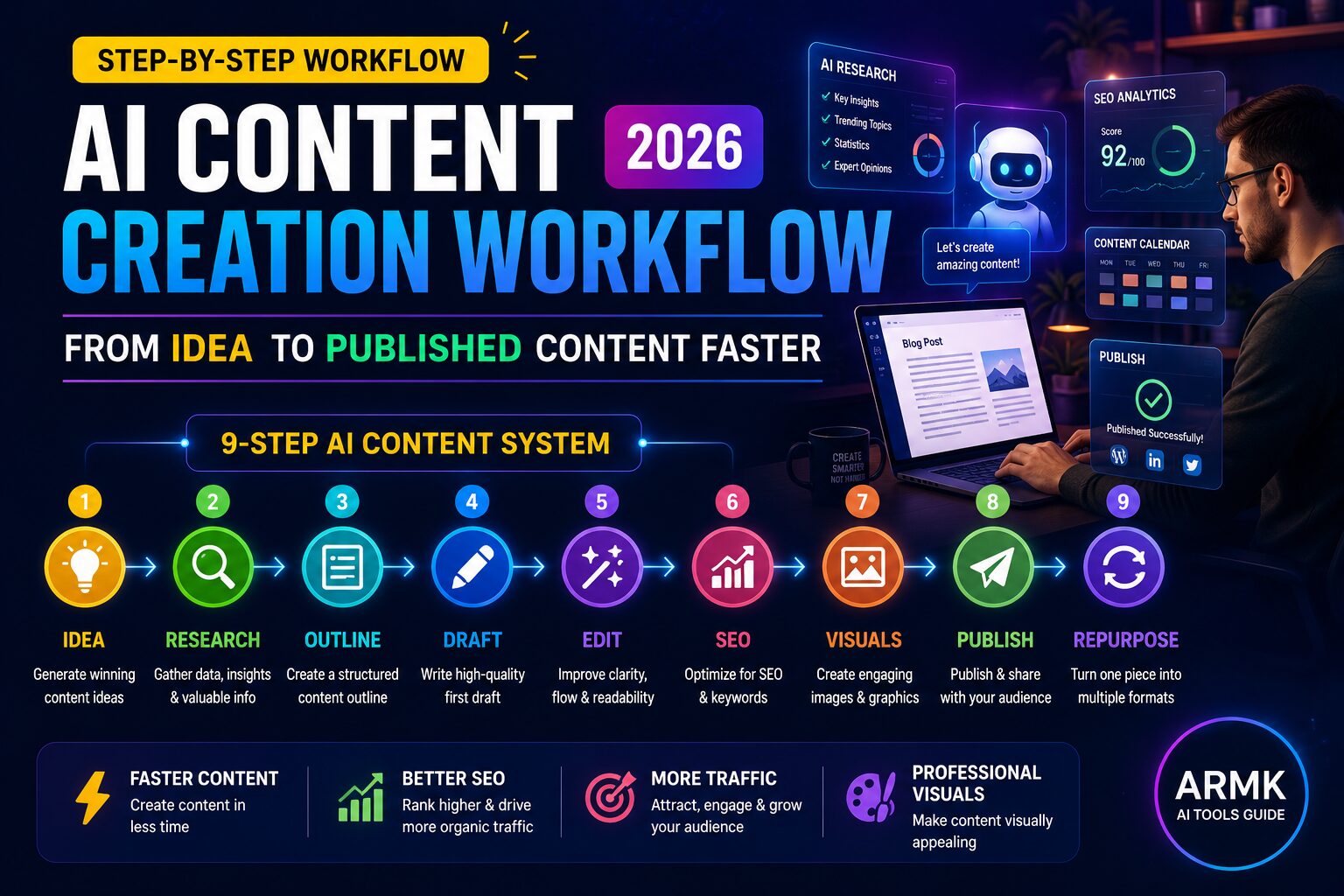
Idea → Research → Outline → Draft → Edit → SEO → Visuals → Publish → Repurpose
Instead of relying on a single AI tool, use specialized tools at each stage to improve quality, speed, and consistency.
Why Most AI Content Fails
Before learning the workflow, understand why most AI-generated content performs poorly.
Mistake #1: Starting With Writing
Most people immediately ask ChatGPT to write.
Professionals start with research.
Mistake #2: Publishing First Drafts
AI drafts are starting points—not finished content.
Every piece should be edited, refined, and improved.
Mistake #3: Ignoring Search Intent
Many creators write what they want.
Successful creators write what audiences are actively searching for.
Mistake #4: Using One Tool for Everything
Different tools excel at different tasks.
Research, writing, editing, SEO, and design often require separate tools.
The Complete AI Content Creation Workflow
Step 1: Find Content Ideas
Everything starts with a good topic.
Use AI to discover:
- audience problems
- trending questions
- content gaps
- keyword opportunities
Recommended Tools
- ChatGPT
- Perplexity AI
- Google Trends
Prompt
Act as a content strategist.

Suggest 20 content ideas about [topic].

Include:
- beginner topics
- comparison topics
- problem-solving topics
- trending opportunities
Goal
Find ideas that solve real problems.
Step 2: Research Before Writing
Research is where great content separates itself from average content.
Use AI to:
- collect information
- compare viewpoints
- identify trends
- gather supporting data
Recommended Tools
- Perplexity AI
- Claude
- Gemini
Prompt
Research [topic].

Summarize:
- key facts
- latest trends
- common mistakes
- expert recommendations
👉 Related Guide:
Best AI Tools for Research Papers
Step 3: Create a Structured Outline
Never start with a blank page.
Create the structure first.
A strong outline makes writing significantly easier.
Prompt
Create a detailed outline for a blog post on [topic].

Include:
- introduction
- key sections
- FAQs
- conclusion
Recommended Tool
ChatGPT
Step 4: Generate the First Draft
Now create the draft.
Do not ask AI to write the entire article at once.
Generate section by section.
Better Workflow
- Introduction
- Main sections
- Examples
- FAQs
- Conclusion
Recommended Tools
- ChatGPT
- Claude
- Jasper
Important
Add your own:
- experiences
- examples
- opinions
- observations
That’s what makes content unique.
Step 5: Improve Readability
Even good drafts can feel robotic.
Editing improves:
- clarity
- flow
- grammar
- readability
Recommended Tools
- Grammarly
- ProWritingAid
Check For
- long sentences
- repeated words
- unnecessary fluff
- confusing explanations
Step 6: Optimize for SEO
SEO begins after writing—not before.
Review:
- title
- headings
- keyword placement
- internal links
- meta description
Recommended Tools
- Rank Math
- Surfer SEO
- NeuronWriter
Internal Linking Example
Link to related content naturally.
For example:
- Best AI Tools for Note Taking
- Best AI Tools for Presentation Making
- ChatGPT Prompts for Students
Step 7: Create Visual Content
Content performs better when supported by visuals.
Visuals help:
- engagement
- understanding
- social sharing
Recommended Tools
- Canva AI
- ChatGPT Images
- Ideogram
Examples:
- feature images
- comparison graphics
- workflows
- before vs after visuals
Read more
Best AI Tools for Presentation Making
Step 8: Publish and Distribute
Publishing isn’t the finish line.
Distribution is where growth happens.
Share content through:
- X (Twitter)
- Email newsletters
- Communities
One article should create multiple content assets.
Step 9: Repurpose Everything
This is where AI saves the most time.
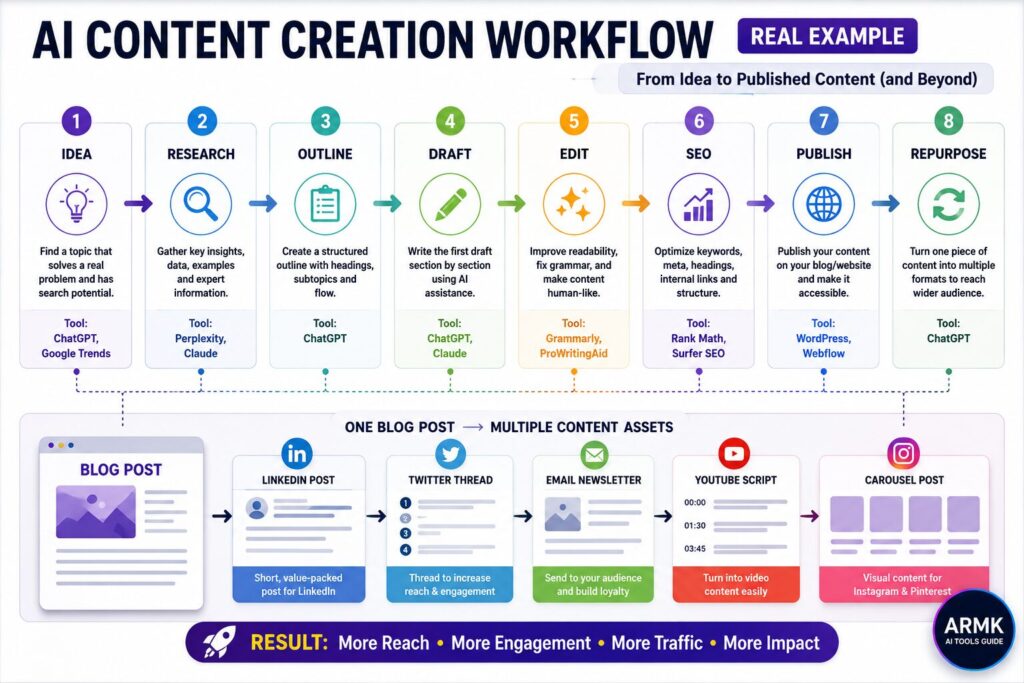
One blog post can become:
- LinkedIn post
- Twitter thread
- newsletter
- YouTube script
- carousel
- short-form content
Prompt
Turn this blog post into:

1 LinkedIn post
1 Twitter thread
1 email newsletter
1 YouTube video outline
Publishing your article is only the beginning. Instead of moving on to the next topic, turn your published content into platform-specific assets for LinkedIn, Pinterest, YouTube, newsletters, and more. Our AI Content Repurposing Workflow shows a practical system for extending the life of every article without simply copying and pasting the same content.
👉 Read next: AI Content Repurposing Workflow (2026)
Best AI Workflow by User Type
Students
Workflow
ChatGPT + Perplexity + Canva
Best for:
- assignments
- presentations
- learning
Read Guide ChatGPT Prompts for Students
Content Creators
Workflow
ChatGPT + Claude + Canva
Best for:
- blogs
- social media
- newsletters
Freelancers
Workflow
ChatGPT + Perplexity + Grammarly
Best for:
- client content
- copywriting
- research projects
Agencies
Workflow
Claude + Perplexity + Surfer SEO
Best for:
- content teams
- large publishing workflows
Example: How a Beginner Can Use This Workflow
Theory is useful, but the real value comes from applying the workflow consistently.
Let’s say your goal is to publish an article on:
“Best AI Tools for Students”
Step 1: Idea Validation
Use ChatGPT or Perplexity to identify common student problems and content opportunities.
Step 2: Research
Use Perplexity to collect facts, competitor insights, and frequently asked questions.
Step 3: Outline Creation
Generate a detailed outline using ChatGPT.
Step 4: Draft Writing
Create the first draft section by section instead of generating the entire article at once.
Step 5: Editing
Use Grammarly to improve readability and fix grammar issues.
Step 6: SEO Optimization
Review headings, internal links, image SEO and meta description.
Step 7: Visual Creation
Design a feature image using Canva or AI image tools or ChatGPT image.
Step 8: Publish & Repurpose
Turn the article into:
- LinkedIn post
- X (Twitter) thread
- Email newsletter
- Pinterest pin
- YouTube script
📊 Visual Workflow: How One Content Idea Becomes Multiple Content Assets
💡 Practical Insight:
Most successful creators don’t create more content.
They create more formats from the same content.
This is where AI creates the biggest productivity advantage.
Instead of creating one content asset, you now create multiple assets from a single idea—helping you reach more people while spending less time creating from scratch.
AI Tools by Content Stage
| Content Stage | Recommended Tool |
|---|---|
| Idea Generation | ChatGPT |
| Research | Perplexity |
| Deep Analysis | Claude |
| Draft Writing | ChatGPT |
| Editing | Grammarly |
| SEO | Rank Math |
| Visual Design | Canva AI |
| Repurposing | ChatGPT |
Common Mistakes Creators Make
Copy-Pasting AI Content
AI should assist—not replace thinking.
Skipping Fact Checking
Always verify important information.
Ignoring Human Experience
Personal examples increase trust.
Publishing Too Quickly
Speed matters.
Quality matters more.
Also read 7 Mistakes Students Make Using AI Tools
Final Recommendation
If you’re just starting, keep things simple.
Use:
- ChatGPT for writing and outlining
- Perplexity for research
- Canva for visuals or ChatGPT image
This combination covers:
- ideas
- research
- content creation
- visual assets
without adding unnecessary complexity.
As your content workflow grows, you can gradually add specialized tools for SEO, editing, and content management.
Remember:
AI doesn’t replace creators.
It removes repetitive work so creators can spend more time on strategy, creativity, and decision-making.
That’s where the real advantage comes from.
FAQs
1. What is an AI content creation workflow?
An AI content creation workflow is a structured process that uses AI tools for idea generation, research, writing, editing, SEO, and content distribution.
2. Which AI tool is best for content creation?
ChatGPT is one of the best all-around content creation tools, while Perplexity excels at research and Canva AI helps with visuals.
3. Can AI create content automatically?
AI can generate drafts and assist with workflows, but human review and editing are still important for quality and accuracy.
4. Is AI-generated content good for SEO?
Yes, if it is edited, optimized, fact-checked, and provides genuine value to readers.
5. Can freelancers use AI for content writing?
Yes. AI can help freelancers research faster, write drafts, edit content, and improve productivity.
6. What is the biggest mistake when using AI for content creation?
Publishing unedited AI content without adding research, examples, and personal insights.