Creating YouTube videos takes more than recording and uploading.
A typical workflow includes brainstorming ideas, researching topics, writing scripts, designing thumbnails, editing videos, optimizing SEO, and repurposing content for other platforms.
Many creators already use AI—but often only for writing scripts.
The bigger opportunity is using AI across the entire workflow.
In this guide, you’ll learn a practical, step-by-step AI workflow that helps YouTube creators produce higher-quality videos faster without relying on AI to make every creative decision.
Table of Contents
Why Most YouTubers Don’t Save Time With AI
Many beginners expect AI to create an entire video from a single prompt.
That usually leads to:
- Generic scripts
- Weak hooks
- Average thumbnails
- Repetitive content
- Low audience retention
The problem isn’t AI.
The problem is using AI without a workflow.
Instead of replacing your creativity, AI should automate repetitive tasks so you can focus on making better videos.
Who Should Use This AI Workflow?
This workflow is designed for creators who want to publish YouTube videos more consistently without relying entirely on AI.
✅ This guide is ideal for:
- Beginner YouTubers building their first channel
- Content creators who want to save time on research and scripting
- Freelancers creating educational or client videos
- Teachers and educators publishing tutorials or online lessons
- Small businesses producing product demos or marketing videos
- Personal brands looking to build trust with consistent, high-quality content
⚠️ This guide may not be the best fit if:
- You’re looking for a fully automated faceless YouTube business model.
- You want AI to create and publish videos without reviewing the output.
- Your primary focus is mass-producing videos rather than building long-term audience trust.
The workflow in this guide assumes that AI is your assistant—not your replacement. It helps automate repetitive tasks while keeping creative decisions and quality control in your hands.
AI Workflow vs YouTube Automation: What’s the Difference?
Many creators use the terms AI workflow and YouTube automation interchangeably, but they describe different approaches.
Understanding the difference can help you choose the workflow that matches your goals.
| AI Workflow | YouTube Automation |
|---|---|
| AI assists you during each stage of content creation. | AI and outsourced services handle most production tasks. |
| You remain responsible for ideas, creativity, and final decisions. | Production is often delegated to tools, freelancers, or automated systems. |
| Best for personal brands, educators, freelancers, and businesses. | Common for faceless or high-volume content channels. |
| Focuses on quality, expertise, and audience trust. | Often focuses on speed, scale, and publishing frequency. |
| AI supports your creative process without replacing your voice. | Automation aims to reduce manual work as much as possible. |
Neither approach is universally better.
If your goal is to build a personal brand, educate an audience, or establish long-term trust, an AI workflow usually provides more control and helps maintain a consistent voice.
If you’re interested in producing a high volume of content for faceless channels, YouTube automation may involve additional workflows, outsourcing, and business considerations beyond the scope of this guide.
For this article, we’ll focus on using AI as a creative assistant that helps you work more efficiently while keeping you in control of the final content.
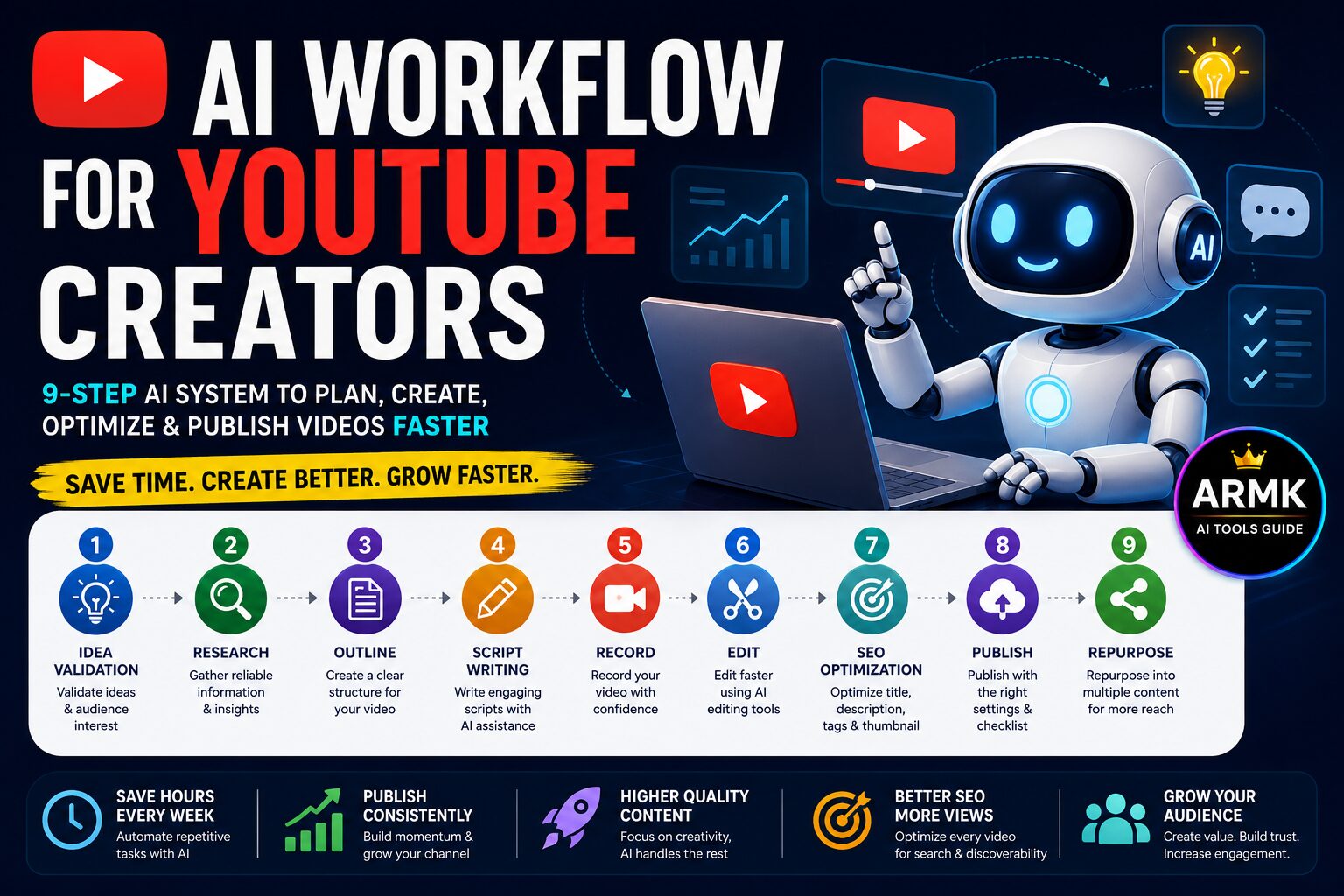
The 9-Step AI Workflow for YouTube Creators
Step 1 — Validate Your Video Idea
Before writing a script, confirm that people actually care about the topic.
Use AI to:
- brainstorm ideas
- identify audience questions
- compare competitors
- generate multiple title angles
Recommended tools:
- ChatGPT
- Perplexity
Decision Tip:
Don’t choose the first idea AI suggests.
Choose the idea that solves a real audience problem.
Step 2 — Research the Topic
Collect:
- statistics
- examples
- recent updates
- expert opinions
- frequently asked questions
Research first.
Script second.
Step 3 — Build a Video Outline
Instead of asking:
Write my entire script.
Ask AI to generate:
- Hook
- Introduction
- Main Points
- Examples
- CTA
A strong outline usually results in a better final script.
Step 4 — Write the Script
Generate one section at a time.
Example workflow:
Hook
↓
Problem
↓
Solution
↓
Examples
↓
CTA
This keeps your script focused and easier to edit.
Using ChatGPT for your script? Read our ChatGPT Content Creation Workflow for Beginners to learn how to generate better prompts, improve AI-generated drafts, and avoid common mistakes before recording your video.
Step 5 — Create Visual Assets
Prepare:
- B-roll ideas
- On-screen text
- Graphics
- Charts
- Screenshots
- Thumbnail concepts
AI helps speed up planning, but you should still choose visuals that support your message.
Step 6 — Record Your Video
Recording is the most human part of the workflow.
Use AI for preparation—not personality.
Your delivery, energy, and communication style are what make your videos memorable.
Step 7 — Edit Faster With AI
Use AI to:
- remove silence
- generate captions
- clean audio
- create clips
- improve pacing
Always review AI edits before publishing.
Step 8 — Optimize for YouTube SEO
Before uploading, optimize:
- Title
- Thumbnail
- Description
- Chapters
- Tags
- Keywords
AI can generate multiple title and description variations, but choose the version that accurately represents your video.
If you’re converting videos into articles, follow our AI Content Creation Workflow (2026) to structure, optimize, and publish high-quality blog content.
Step 9 — Publish & Repurpose
Don’t stop after uploading.
Repurpose your video into:
- Shorts
- Blog article
- LinkedIn post
- Newsletter
- X thread
- Pinterest pin
One video can become multiple pieces of content.
A YouTube video shouldn’t end after it’s published. One video can become LinkedIn posts, Pinterest Pins, newsletters, Quora answers, and more. Following a structured repurposing workflow helps you reach more people without creating new content from scratch.
👉 Explore the AI Content Repurposing Workflow (2026).
Recommended AI Tools for Each Stage
Choosing the right AI tool depends on the task you’re trying to complete.
Instead of using one tool for everything, combine specialized tools to create a smoother and more efficient workflow.
The table below can help you decide which tool fits each stage of YouTube content creation.
| Workflow Stage | Best Choice | Free Alternative | Best For |
|---|---|---|---|
| Idea Validation | ChatGPT | Gemini | Brainstorming video ideas and content angles |
| Research | Perplexity | ChatGPT | Finding accurate information, examples, and sources |
| Script Writing | ChatGPT | Claude | Creating structured video scripts |
| Thumbnail Design | Canva | Adobe Express | Designing attention-grabbing thumbnails |
| Video Editing | CapCut | DaVinci Resolve | Faster editing, captions, and basic enhancements |
| YouTube SEO | TubeBuddy | vidIQ Free | Optimizing titles, descriptions, tags, and keywords |
| Content Repurposing | Opus Clip | Klap | Turning long videos into Shorts and social clips |
How to Choose the Right Tool
You don’t need every AI tool on day one.
Choose tools based on your current bottleneck.
- Struggling to find video ideas? Start with ChatGPT or Gemini.
- Need better research? Use Perplexity before writing your script.
- Want faster editing? CapCut is a beginner-friendly option.
- Trying to improve video discoverability? TubeBuddy or vidIQ can help optimize your uploads.
- Creating content for multiple platforms? Repurpose one video into Shorts, blog posts, or social media clips using tools like Opus Clip.
As your workflow grows, you can gradually add more specialized tools instead of replacing your entire process.
💡 Practical Tip
The goal isn’t to collect the most AI tools.
The goal is to build a repeatable workflow where each tool solves one specific problem. A simple workflow with a few well-chosen tools is often more effective than using many tools without a clear process.
Real Example: From Idea to Published Video
Let’s say you want to publish a YouTube video titled:
“10 ChatGPT Tips Every Beginner Should Know (2026)”
Here’s how this workflow helps you move from idea to published video.
Step 1: Validate the Idea
Use ChatGPT, Google Search, or YouTube Search to discover common beginner questions about ChatGPT.
Goal:
- Confirm people are searching for the topic.
- Identify content gaps.
- Understand what viewers actually want to learn.
Step 2: Research
Use Perplexity or reliable sources to gather:
- recent ChatGPT features
- practical examples
- common beginner mistakes
- useful statistics or references
This helps improve the accuracy of your video.
Step 3: Create an Outline
Ask ChatGPT to organize the video into logical sections.
Example:
- Introduction
- Tip 1
- Tip 2
- Tip 3
- Common mistakes
- Final recommendations
- Call to action
A clear outline usually makes recording much easier.
Step 4: Write the Script
Instead of asking ChatGPT to generate the entire script at once, write one section at a time.
After each section:
- simplify complex explanations
- add your own examples
- adjust the tone to match your audience
This keeps the script more natural and easier to present on camera.
Step 5: Record and Edit
Record the video using your preferred setup.
Then use AI-assisted editing tools to:
- remove pauses
- generate captions
- improve pacing
- add B-roll suggestions
- enhance audio if needed
Step 6: Optimize for YouTube
Before publishing:
- write a compelling title
- design a clear thumbnail
- optimize the description
- add timestamps
- include relevant keywords naturally
Step 7: Publish and Repurpose
After the video goes live:
- create YouTube Shorts
- turn the script into a blog article
- publish key insights on LinkedIn
- share tips on X or Threads
- answer related questions on Reddit or Quora
One well-planned video can become multiple pieces of content across different platforms.
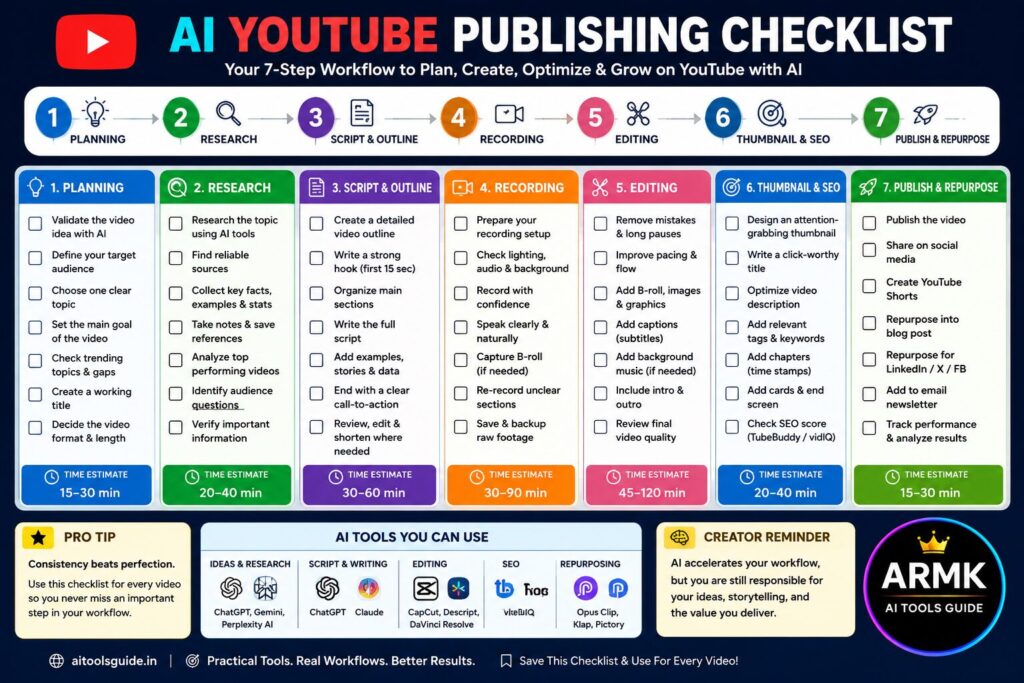
✅ Free AI YouTube Publishing Checklist
Following the same workflow every time makes it easier to publish consistently and reduces the chance of missing important steps.
Use this checklist before publishing your next YouTube video.
1. Planning
☐ Validate the video idea
☐ Define the target audience
☐ Choose one clear topic
☐ Decide the main goal of the video
2. Research
☐ Collect reliable information
☐ Save useful references
☐ Verify important facts
☐ Identify examples and statistics
3. Script & Outline
☐ Create a video outline
☐ Write a compelling hook
☐ Structure the main sections
☐ End with a clear call-to-action
4. Recording
☐ Prepare your recording setup
☐ Check lighting and audio
☐ Record confidently
☐ Re-record unclear sections if needed
5. Editing
☐ Remove mistakes and long pauses
☐ Add captions
☐ Include B-roll or graphics
☐ Review pacing and transitions
6. Thumbnail & SEO
☐ Design an attention-grabbing thumbnail
☐ Write a clear YouTube title
☐ Optimize the description
☐ Add chapters and relevant keywords
7. Publish & Repurpose
☐ Publish the video
☐ Share it on social media
☐ Create YouTube Shorts
☐ Turn the video into a blog post
☐ Repurpose content for LinkedIn or X
☐ Track video performance
🎁 Free Download
Prefer a reusable version?
Download the AI YouTube Publishing Checklist in your preferred format:
- 📄 Printable PDF
- 🖼️ Image Checklist (PNG)
- 📝 Notion Template (coming soon)
- 📊 Google Sheets Tracker (coming soon)
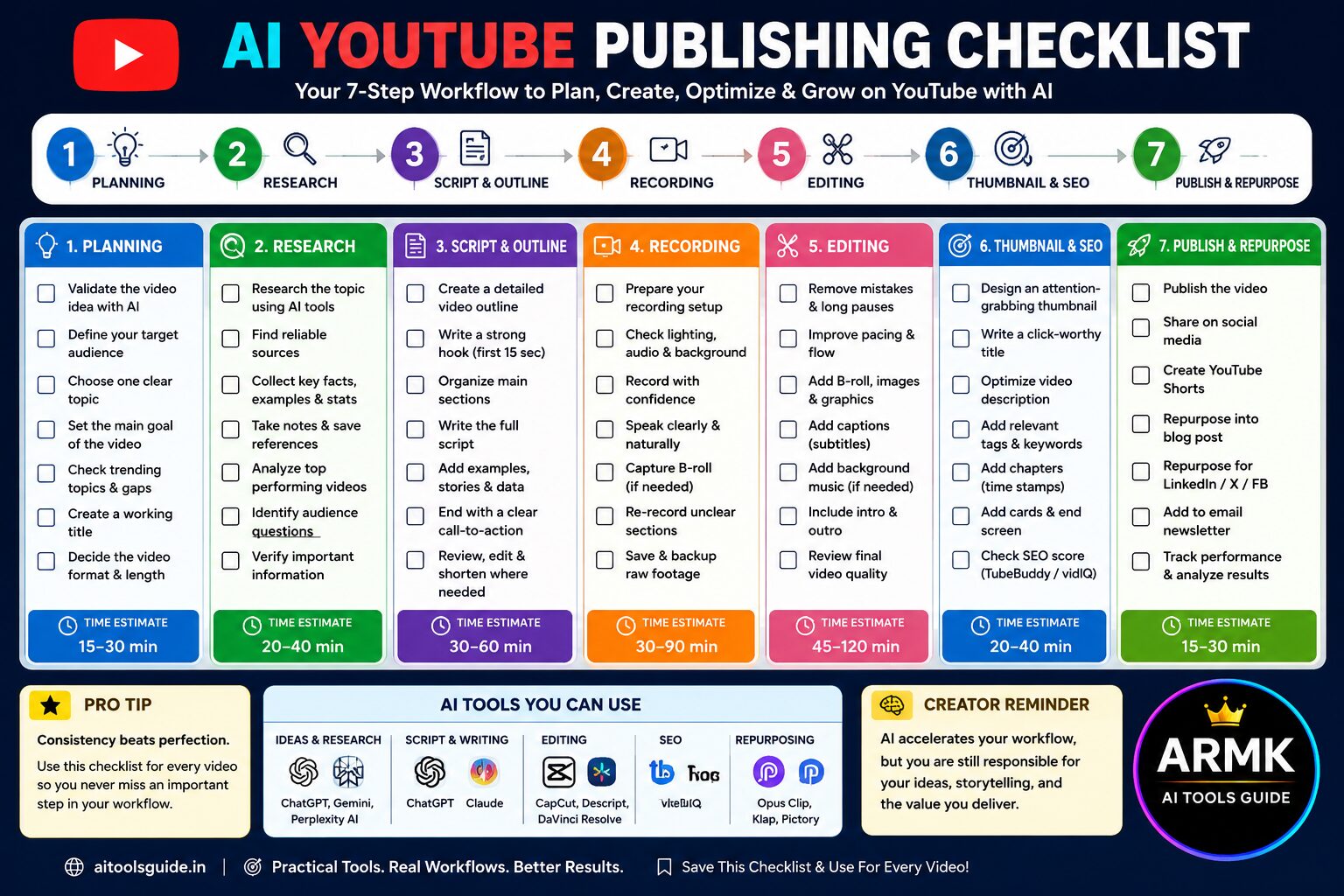
Use the same checklist for every video to build a more consistent publishing workflow.
💡 Practical Tip
A checklist won’t make a video successful by itself.
Its purpose is to reduce avoidable mistakes and create a repeatable process. Over time, consistency in planning, production, and publishing often matters more than relying on a single AI tool.
Common Mistakes YouTube Creators Make With AI
Writing the script before validating the idea
Using AI-generated scripts without editing
Ignoring audience retention
Overusing AI-generated visuals
Publishing without optimizing titles and thumbnails
Forgetting to repurpose content
Final Recommendation
Think of AI as your production assistant—not your replacement.
Use it to automate repetitive tasks like research, outlining, editing support, and SEO preparation, while keeping your own expertise and creativity at the center of every video.
Creators who combine AI with strong ideas and consistent execution are more likely to build a sustainable YouTube channel than those who rely on AI alone.
FAQs
1. What is an AI workflow for YouTube creators?
An AI workflow is a structured process that uses AI tools to assist with idea generation, research, scripting, editing, SEO, and content repurposing while keeping creative decisions in the hands of the creator.
2. Can AI create an entire YouTube video?
AI can help with many parts of video creation, but reviewing, recording, editing, and ensuring accuracy are still important responsibilities for the creator.
3. Which AI tool is best for YouTube creators?
There isn’t a single best tool. Many creators combine ChatGPT for scripting, Perplexity for research, Canva for thumbnails, and CapCut or Descript for editing.
4. Should beginners use AI for YouTube?
Yes. Beginners can save time and learn faster by using AI as an assistant rather than depending on it to create finished videos.
5. How can AI help YouTube creators publish faster?
AI can reduce time spent on brainstorming, research, outlining, script drafting, editing assistance, and SEO preparation, allowing creators to focus more on recording and delivering valuable content.