
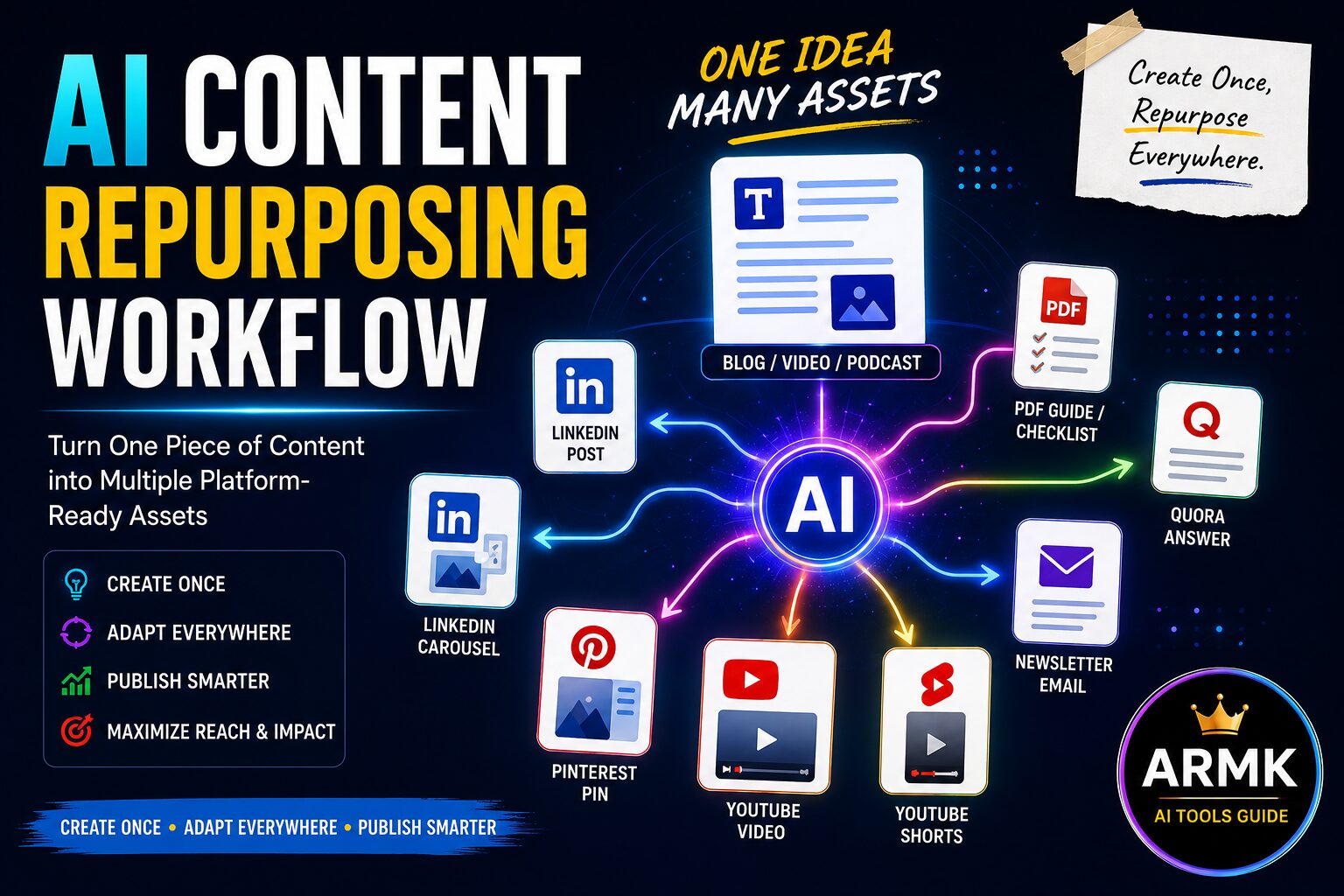
Creating high-quality content takes time.
Researching a topic, writing a blog post, recording a YouTube video, or designing an infographic can easily take several hours—or even days.
Yet many creators make one common mistake:
They publish their content once and immediately move on to the next idea.
As a result, valuable content reaches only a small portion of their audience before being forgotten.
A more effective approach is to repurpose existing content into multiple formats for different platforms.
Instead of creating ten different pieces of content from scratch, you can transform one well-researched article or video into blog posts, social media updates, newsletters, short-form videos, infographics, and more.
When combined with AI tools, this process becomes faster while still allowing you to maintain quality and creative control.
In this guide, you’ll learn a practical AI Content Repurposing Workflow that helps you adapt one piece of content into multiple platform-specific assets without simply copying and pasting the same message everywhere.
If you haven’t created your original content yet, start with one of these practical workflows:
• ChatGPT Content Creation Workflow for Beginners – Learn how to create your first AI-assisted content step by step.
• AI Content Creation Workflow (2026) – Build a complete research-to-publish system before repurposing your content.
• AI Workflow for YouTube Creators – Apply the same workflow specifically to YouTube content creation.
Table of Contents
Why Most Creators Struggle to Stay Consistent
Many creators believe consistency means constantly producing new content.
In reality, consistency often comes from making better use of the content you’ve already created.
Imagine spending eight hours writing a detailed blog article.
After publishing it, you immediately start researching your next topic.
Meanwhile, that same article could also become:
- A LinkedIn post
- A LinkedIn carousel
- A Pinterest Pin
- A newsletter
- A YouTube script
- Several YouTube Shorts
- Instagram carousel posts
- Quora answers
- Reddit discussions
- A downloadable checklist or PDF
The challenge isn’t always a lack of ideas.
More often, it’s a lack of a repeatable system for adapting content to different platforms.
That’s exactly what this workflow is designed to solve.
Who Should Use This Workflow?
This workflow is designed for creators who want to increase the value of every piece of content they publish instead of constantly starting from scratch.
This guide is ideal for:
- Bloggers who want to reach more readers across multiple platforms.
- YouTube creators who want to turn videos into blogs, Shorts, newsletters, and social posts.
- Freelancers creating content for clients.
- Personal brands building authority through consistent publishing.
- Small businesses producing educational or marketing content.
- Students learning practical content marketing and AI workflows.
This guide may not be the best fit if:
- You’re looking for one-click content automation without reviewing the output.
- You plan to publish identical content across every platform.
- Your goal is quantity rather than long-term audience trust.
This workflow assumes that AI helps automate repetitive tasks while you remain responsible for the final message, quality, and platform-specific adjustments.
What Is AI Content Repurposing?
AI content repurposing is the process of using AI tools to transform one original piece of content into multiple formats tailored for different platforms and audiences.
For example, a single blog article can become:
- A LinkedIn post
- A LinkedIn carousel
- A Pinterest infographic
- A YouTube script
- A short video
- An email newsletter
- A downloadable checklist
- A Twitter/X thread
- A Quora answer
The goal isn’t to duplicate the same content everywhere.
Instead, it’s to adapt the core message so it matches the style, audience, and format of each platform.
Think of AI as a creative assistant that helps restructure, summarize, rewrite, and optimize your content while you make the final editorial decisions.
AI Content Repurposing vs Copy-Pasting
Many beginners confuse repurposing with reposting.
They’re not the same.
| Copy-Pasting | AI Content Repurposing |
|---|---|
| Publishes identical content everywhere | Adapts content for each platform |
| Ignores platform-specific audiences | Matches the format and expectations of each platform |
| Often reduces engagement | Improves relevance and user experience |
| Saves time initially | Builds long-term content value |
| Can appear repetitive | Creates fresh content from one original idea |
A LinkedIn audience, for example, expects concise professional insights, while Pinterest users often prefer visual inspiration and YouTube viewers usually engage better with video-first content.
Repurposing respects these differences instead of treating every platform the same.
9-Step AI Content Repurposing Workflow
Before repurposing any content, remember this principle:
Start with one high-quality piece of content. Then adapt it for each platform instead of creating everything from scratch.
The workflow below helps you do exactly that.
Visual: One Idea → Multiple Content Assets
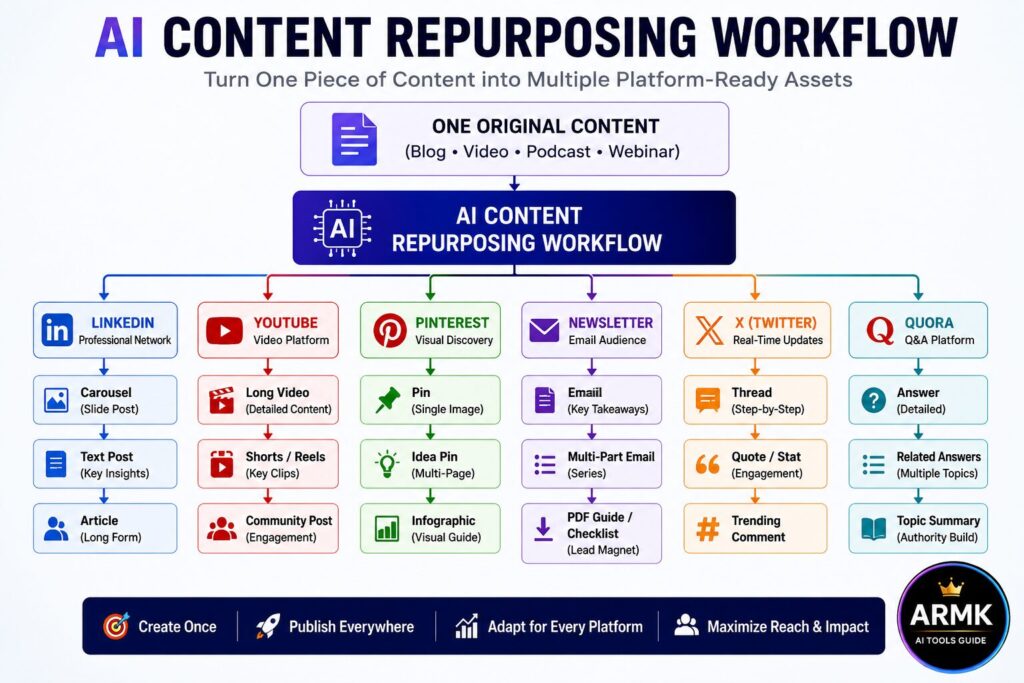
AI Content Repurposing Workflow: Start with one high-quality piece of content, then use AI to adapt it into platform-specific assets for LinkedIn, YouTube, Pinterest, newsletters, X, Quora, and more—without simply copying and pasting the same content.
Step 1: Start with High-Value Content
Not every blog post or video deserves to be repurposed.
The best results usually come from content that:
- solves a real problem
- receives positive engagement
- answers common questions
- remains useful over time (evergreen)
For example, instead of repurposing a short announcement, choose a detailed tutorial, guide, or case study that contains enough value to be adapted into multiple formats.
Why these matters
Strong source content makes every repurposed asset more useful. If the original content lacks depth, every version built from it will also have limited value.
Step 2: Define Your Repurposing Goal
Before creating anything new, decide what you want to achieve.
Your goal influences the formats you should create.
Trying to create everything at once usually leads to inconsistent quality.
Start with the formats that support your primary objective.
🎯 Repurposing Decision Matrix
Choose Your Repurposing Strategy Based on Your Goal
You don’t need to create every type of content from every blog post or video.
Instead, choose the formats that support your primary objective.
| Your Goal | Best Content to Create | AI Tools That Can Help |
|---|---|---|
| Drive website traffic | Pinterest Pins, Blog Summary, Newsletter | ChatGPT, Canva |
| Build personal authority | LinkedIn Post, LinkedIn Carousel | ChatGPT, Canva |
| Grow YouTube channel | Shorts, Community Posts, Video Description | ChatGPT, CapCut |
| Increase social engagement | X Thread, Quora Answer | ChatGPT |
| Generate leads | PDF Checklist, Email Newsletter | ChatGPT, Canva Docs |
| Save time | Repurpose one article into multiple formats | ChatGPT + your preferred AI tools |
Tip: Start with one or two platforms where your audience is already active. Once your workflow becomes consistent, you can expand to additional channels.
Step 3: Choose the Right Platforms
Every platform has different audience expectations.
Instead of posting identical content everywhere, choose platforms that match your audience.
For example:
- LinkedIn → Professional insights and practical tips
- Pinterest → Visual guides and infographics
- YouTube → Tutorials, demonstrations, and explanations
- Email → Deeper insights and updates
- Quora & Reddit → Helpful answers and discussions
You don’t need to be active on every platform.
Publishing consistently on a few relevant platforms is usually more effective than spreading yourself too thin.
Step 4: Adapt the Content for Each Platform
This is where AI becomes most useful.
Instead of asking AI to rewrite everything, give it a clear role.
Examples:
- Summarize a blog into a LinkedIn post.
- Convert key points into a carousel outline.
- Rewrite an article as a YouTube script.
- Turn FAQs into Quora answers.
- Extract statistics for social media posts.
The core message stays the same, but the presentation changes to suit each platform.
Step 5: Create Platform-Specific Visuals
Visual content often performs better than text alone.
Depending on the platform, create:
- Pinterest Pins
- LinkedIn carousels
- Infographics
- YouTube thumbnails
- Short-form video graphics
AI design tools can speed up this process, but review every visual to ensure it accurately represents your message and follows your branding.
Step 6: Optimize Before Publishing
Repurposed content should be optimized—not just reformatted.
Before publishing:
- write a platform-specific title
- adjust the tone
- optimize keywords where relevant
- add hashtags only when appropriate
- include a clear call to action
Small improvements at this stage can significantly increase visibility and engagement.
Step 7: Publish Strategically
Avoid publishing every version on the same day.
Instead, spread your content over time.
For example:
- Monday → Blog
- Tuesday → LinkedIn
- Wednesday → Pinterest
- Thursday → Newsletter
- Friday → YouTube Short
This approach helps maintain consistency without constantly creating new content.
Step 8: Measure What Performs Best
Not every format will produce the same results.
Track metrics such as:
- clicks
- saves
- shares
- comments
- watch time
- newsletter opens
Over time, these insights help you identify which formats deserve more attention.
Step 9: Improve and Repeat
Repurposing is an ongoing process.
Review your highest-performing content regularly.
Update outdated information, improve visuals, test different headlines, and experiment with new formats.
Each improvement increases the long-term value of your original content and reduces the effort required to create future assets.
Common Mistakes to Avoid When Repurposing Content with AI
Learning the workflow is important.
Applying it correctly is what produces better results.
Here are some of the most common mistakes creators make when repurposing content with AI.
Mistake #1: Publishing the Same Content Everywhere
Repurposing doesn’t mean copying and pasting the same text across every platform.
Each platform has its own audience, content format, and expectations.
For example:
- A LinkedIn post should focus on professional insights.
- A Pinterest Pin should highlight a visual takeaway.
- A YouTube Short should quickly demonstrate one valuable idea.
Keeping the core message the same while adapting the presentation usually produces better engagement.
Mistake #2: Starting with Weak Source Content
AI cannot turn low-value content into high-value content.
If the original blog, video, or podcast lacks useful information, every repurposed version will have the same limitation.
Start with content that:
- solves a real problem
- answers common questions
- remains useful over time
- provides clear, practical value
Strong source content creates stronger repurposed assets.
Mistake #3: Trying to Repurpose Everything
Not every article or video needs to become ten different content pieces.
Instead, prioritize your best-performing or evergreen content.
Repurposing fewer high-quality pieces usually delivers better long-term results than spreading your efforts too thin.
Mistake #4: Letting AI Make Every Decision
AI can help summarize, rewrite, and restructure content.
However, it shouldn’t decide:
- which audience to target
- which examples to include
- what brand voice to use
- which platforms deserve the most attention
These strategic decisions still belong to the creator.
Mistake #5: Never Measuring Results
Repurposing is only effective if you understand what works.
Track metrics such as:
- clicks
- saves
- shares
- comments
- watch time
- newsletter opens
Over time, these insights help you identify the formats worth repeating.
Example: How One Blog Post Became Eight Content Assets
Imagine you’ve just published this article on your website:
ChatGPT Content Creation Workflow for Beginners
The article took several hours to research, write, edit, and publish.
Instead of moving on to the next topic immediately, you decide to repurpose the same content using AI.
Here’s what that process could look like.
Step 1: Identify the Core Message
Before opening any AI tool, ask yourself:
“What’s the one idea readers should remember after reading this article?”
For this example, the core message is:
A structured ChatGPT workflow helps creators produce better content faster without relying on copy-and-paste AI writing.
Everything you create next should reinforce this same message.
Step 2: Create a LinkedIn Post
Ask ChatGPT to summarize the article into a short LinkedIn post.
Instead of explaining the complete workflow, focus on one practical lesson that encourages discussion.
Goal: Build authority and reach professionals interested in AI and content creation.
Step 3: Design a LinkedIn Carousel
Extract the most valuable steps from the article and turn them into a visual carousel.
For example:
- Mistake beginners make
- Better workflow
- Key takeaway
- Final recommendation
Goal: Increase saves, shares, and engagement.
Step 4: Create a Pinterest Pin
Use Canva to design a vertical infographic highlighting the workflow.
Include a simple title such as:
ChatGPT Content Workflow in 7 Steps
Link the Pin back to your original article.
Goal: Generate long-term website traffic.
Step 5: Turn It into a YouTube Video
Use the article outline to create a video script.
Instead of reading the article word for word, expand each section with practical examples and demonstrations.
Goal: Reach audiences who prefer learning through video.
Step 6: Publish YouTube Shorts
Break the article into several quick tips.
Each tip becomes a separate Short, for example:
- One common ChatGPT mistake
- One workflow tip
- One useful prompt
- One productivity shortcut
Goal: Increase discoverability and attract new viewers.
Step 7: Send a Newsletter
Summarize the article into a short email.
Share:
- one key insight
- one practical takeaway
- a link to the complete guide
Goal: Bring subscribers back to your website.
Step 8: Create a Downloadable Resource
Transform the workflow into a practical resource, such as:
- Printable PDF
- Workflow Checklist
- Google Sheets Tracker
- Notion Template
These resources extend the value of your original article while giving readers something they can reuse.
Goal: Increase engagement, encourage return visits, and build trust.
Final Result
Instead of publishing one blog post, you’ve created a complete content ecosystem.
One Blog → Eight Content Assets
| Original Content | Repurposed Asset | Primary Goal |
|---|---|---|
| Blog Article | LinkedIn Post | Build authority |
| Blog Article | LinkedIn Carousel | Increase engagement |
| Blog Article | Pinterest Pin | Drive website traffic |
| Blog Article | YouTube Video | Reach video-first audiences |
| Blog Article | YouTube Shorts | Improve discoverability |
| Blog Article | Newsletter | Re-engage subscribers |
| Blog Article | Downloadable Resource | Build trust and encourage repeat visits |
| Blog Article | Future Social Posts | Extend the content lifecycle |
The original idea didn’t change.
Only the format, presentation, and platform changed.
That’s the difference between simply publishing content and building a sustainable content system.
Free AI Content Repurposing Checklist
Before publishing, make sure you’ve completed these steps:
☐ Chosen high-value source content
☐ Defined your primary goal
☐ Selected the right platforms
☐ Adapted the content for each platform
☐ Created platform-specific visuals
☐ Optimized titles and descriptions
☐ Published using a consistent schedule
☐ Reviewed performance metrics
☐ Updated your best-performing assets
Download Free AI Workflow Resources
Want to save time every time you create or repurpose content?
Download our free templates designed to help you follow this workflow consistently.
Available Resources
📄 Printable PDF Checklist
A print-friendly version you can use while creating or repurposing content.
📊 Google Sheets Tracker
Track your content, publishing schedule, and repurposing progress in one place.
🖼️ Quick Reference PNG
A visual workflow you can save on your phone or desktop for easy reference.
📝 Notion Template (Coming Soon)
Manage your entire AI content workflow with reusable checklists and status tracking.
🎁 Bonus Resource
AI Tools Guide Workflow Library
As we publish more workflow guides, you’ll be able to download matching templates for:
- AI Content Creation Workflow
- ChatGPT Content Creation Workflow
- AI Workflow for YouTube Creators
- AI Content Repurposing Workflow
- Future creator workflows
This turns your website from a collection of articles into a growing library of practical resources.
Related Guides
To build a complete AI-powered content workflow, continue with these guides:
- AI Content Creation Workflow (2026) — Learn how to create high-quality content from idea to publication.
- ChatGPT Content Creation Workflow for Beginners — Use ChatGPT effectively for brainstorming, outlining, drafting, and editing.
- AI Workflow for YouTube Creators — Plan, script, optimize, and publish YouTube videos with AI.
- Best AI Tools for Content Creators (or your equivalent tools roundup) — Compare AI tools for writing, design, research, and productivity.
Final Thoughts
Creating more content isn’t always the answer.
Creating more value from the content you already have is often a smarter strategy.
AI content repurposing helps reduce repetitive work by transforming one original idea into multiple platform-ready formats. But successful repurposing still depends on thoughtful planning, platform-specific optimization, and human review.
Start with one high-quality piece of content, adapt it for the platforms that matter most to your audience, measure the results, and improve your workflow over time.
Done consistently, this approach can help you publish more efficiently while building a stronger presence across multiple channels.
FAQs
1. What is AI content repurposing?
AI content repurposing is the process of using AI tools to transform one original piece of content into multiple platform-specific formats, such as LinkedIn posts, Pinterest Pins, YouTube scripts, newsletters, and social media content, while adapting the message for each audience.
2. What’s the difference between content repurposing and content recycling?
Content repurposing adapts existing content into new formats or platforms while preserving its core message.
Content recycling usually means republishing the same content with little or no meaningful adaptation. Repurposing aims to provide value that’s appropriate for each platform rather than simply repeating identical content.
3. Which AI tools are best for content repurposing?
There isn’t a single best tool for every task.
Many creators combine different AI tools based on their workflow, such as:
ChatGPT for rewriting and summarizing
Canva for visuals
CapCut for short-form videos
Perplexity for research and fact-checking
The best choice depends on the type of content you’re repurposing.
4. Can AI automatically repurpose content for every platform?
AI can help rewrite, summarize, and adapt content for different formats, but human review is still important.
Each platform has different audiences and content expectations, so reviewing AI-generated content before publishing helps maintain quality and accuracy.
5. How many times should I repurpose one piece of content?
There is no fixed number.
A detailed blog post or video can often be adapted into several useful content formats, provided each version offers value and is tailored to the platform where it will be published.
6. Is AI content repurposing good for beginners?
Yes.
Beginners can save time by using AI to restructure, summarize, and adapt existing content instead of creating everything from scratch. Starting with one or two platforms and expanding gradually is often easier than trying to publish everywhere at once.