✨ Introduction: From Study Stress to AI-Powered Focus
Managing assignments, notes, and deadlines can be overwhelming — but what if an AI could do half your brainwork?
That’s where Notion AI steps in — your intelligent study assistant inside the app you already love for planning and note-taking.
👉 Whether you’re a college student, researcher, or school learner, Notion AI helps you summarize notes, create study plans, and generate smart content instantly.
Table of Contents
What Is Notion AI — Smart Assistant for Students 🧩
Notion AI is an integrated assistant within Notion that helps you:
- Summarize long notes
- Generate content ideas
- Write and edit text
- Translate, explain, or simplify concepts
- Automate repetitive tasks (like creating class summaries)
💡 Simply type “/Ask AI” or press Spacebar → AI prompt → done!
Why Students Should Use Notion AI 🎓
Notion AI isn’t just a tool — it’s your digital mentor. Here’s why:
| Benefit | Description |
|---|---|
| 🗒️ Smart Notes | Summarizes class lectures or PDFs instantly. |
| 🧭 Study Planner Templates | Auto-creates your timetable with task tracking. |
| 💬 AI Writing Help | Rewrites essays or explains tough topics. |
| 🔍 Research Assistance | Helps gather key points from long articles. |
| ⏱️ Time Saver | Reduces manual writing effort by 60–70%. |
Let’s visualize the difference between traditional studying and AI-assisted studying.
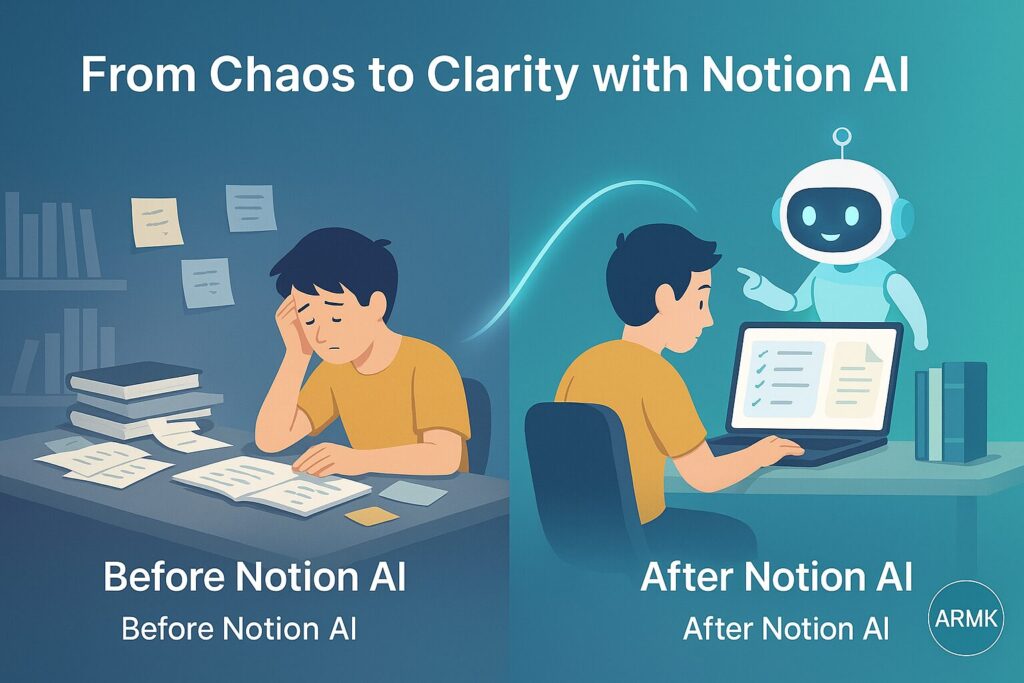
The “After Notion AI” side represents exactly how students can achieve better focus, faster note-taking, and clearer project tracking using AI tools.
🔗 Also read: Best AI Tools for Students 2025
How to Use Notion AI for Students (Step-by-Step) 🧠
1️⃣ Open Your Notion Workspace → Create a new page for your semester or subject.
2️⃣ Enable Notion AI → Type “/Ask AI” or click the “AI” icon in toolbar.
3️⃣ Choose an Intent:
- “Summarize this page”
- “Explain like I’m 5”
- “Create study notes from this text”
4️⃣ Use AI Prompts Smartly:
Example:
“Explain Quantum Mechanics for a college student preparing for exams.”
5️⃣ Organize Your Notes → Use linked databases or AI-generated tags.
Notion AI for Note Taking 📚
With Notion AI Note Taking, you can:
- Convert voice recordings or meeting notes into clear text
- Auto-summarize lecture notes
- Extract definitions, formulas, and key takeaways
💡 Tip: Use prompt — “Summarize this note into 5 key points for quick revision.”
Notion AI Study Planner (Free Templates for Students) 🗓️
Students can use Notion AI Study Planner templates to manage:
- Weekly study goals
- Exam countdowns
- Assignment tracking
- Reading lists
👉 Popular searches include:
- “Notion AI study planner free download”
- “Notion AI study planner PDF”
- “Notion AI study planner template”
✨ Bonus Idea:
Ask Notion AI: “Create a study schedule for upcoming exams with daily breaks and revision slots.”
Is Notion AI Free for Students?
✅ Yes, partially.
Students can access basic Notion AI features with the free education plan, but advanced AI tasks (summarization, long content writing) require the Notion Plus or AI add-on plan.
🎓 Pro Tip: Use your .edu or student email ID to unlock Notion’s Education Plus plan discounts.
How to Use Notion AI Effectively (for Study Success)💡
- Use Templates Wisely → Don’t start blank.
- Keep Prompts Specific → e.g., “Explain chapter 3 summary in 150 words.”
- Integrate with Google Calendar → Track tasks & exams together.
- Use AI to Generate Flashcards → Great for quick memory recall.
Notion AI for Research Students 🔍
If you’re doing academic work, Notion AI can:
- Summarize research papers
- Generate abstracts
- Help organize citations
- Write outlines for literature reviews
💡 Example prompt:
“Summarize the research paper on ‘AI in Education’ into 3 key findings for my presentation.”
Notion AI vs Other Student Tools ⚖️
| Tool | Best For | AI Support | Price |
|---|---|---|---|
| Notion AI | Study planning, notes, writing | ✅ Built-in | Free + Paid |
| Grammarly AI | Grammar + tone | ✅ | Free + Premium |
| Perplexity AI | Research + answers | ✅ | Free |
| ChatGPT 5 | Deep writing, Q&A | ✅ | Free + Plus |
Pros & Cons of Notion AI for Students 📈
| ✅ Pros | ⚠️ Cons |
|---|---|
| Easy to use & built-in | Limited features in free plan |
| Great for notes & study planning | Sometimes generic output |
| Ideal for summarizing & rewriting | AI add-on is paid |
| Boosts productivity & focus | Needs manual prompt tweaking |
💬 Real User Reviews (Trust Section)
Want to know what real users think about Notion AI?
Here’s a snapshot from trusted review platforms 👇
⭐ G2 Reviews:
4.6 / 5 (based on 7879+ verified user ratings)
Most users praise Notion AI for helping them summarize notes, generate structured outlines, and write faster without losing personal tone.
🔗 View on G2 →
🗣️ Reddit Feedback:
Active discussions in r/Notion & r/NotionAI mention it as a “time-saver for note management” and “ideal for students.”
Common feedback: works great for structured writing but less creative freedom.
🔗 Check Reddit Threads →
💯 Trustpilot Ratings:
2.6 / 5 (based on 330+ reviews)
Most users appreciate the AI assistant’s clarity and smooth integration with Notion workspace.
🔗 Read Trustpilot Reviews →
📊 Summary Insight
Across platforms, Notion AI maintains an average user satisfaction of 3.6★+, with strong scores for organization, time-saving, and academic writing support.
❓ FAQs
Q1. Is Notion AI free for students?
Some features are free, but advanced AI tools need a paid add-on.
Q2. How to use Notion AI for note-taking?
Simply type “/Ask AI” and choose Summarize, Explain, or Translate.
Q3. Can Notion AI make study plans?
Yes — use prompts like “Create my exam study plan with breaks.”
Q4. Is Notion AI better than ChatGPT for students?
Notion AI is better for structured study tasks; ChatGPT is better for open-ended writing.
🏁 Final Thoughts
In 2025, Notion AI is not just a productivity app — it’s a study accelerator for smart students.
It blends AI writing, note-taking, and time management into one platform that evolves with your learning habits.
💡 Pro Tip: Combine Notion AI + Grammarly AI to double your writing accuracy and productivity.